The new Voice Notes feature works for meetings, lectures, interviews, and ideas on the go, keeping every recording alongside other files in Documents on iPhone, iPhone Duo, and iPad.
-- The best ideas don't always come up at a desk, and they rarely wait for someone to write them down.

Documents by Readdle (documents.io) released Voice Notes for iPhone, iPhone Duo, and iPad. The feature is designed for anyone who needs to capture an important work conversation or a personal thought without stopping to write it down.
How to use Voice Notes in Documents
Users start a recording from the + button or the Action button. When they stop, Documents generates a summary of the main points, follow-ups with action items and questions to revisit, and a full transcript. Voice Notes supports multiple languages, including conversations where more than one language is spoken.
A journalist can record a press conference and pull quotes straight from the transcript. A student can stay focused on a lecture and review the summary next to the slides later. A writer can think out loud on a walk and come back to a structured list of ideas.
Voice Notes is the latest addition to the 40+ tools in Documents.
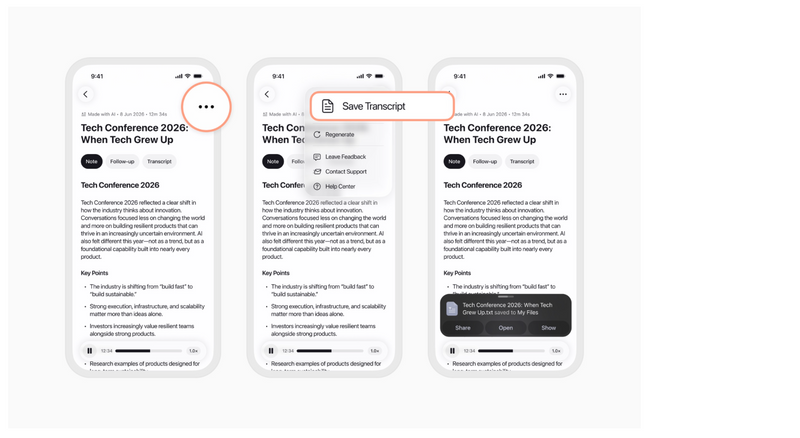
Recording, summary, and transcript in one file
Each voice note is a single file that holds the original recording, summary, follow-ups, and transcript, and can be opened, shared, or moved in one piece. Inside, users can switch between views, listen back, or copy the parts they need.
The transcript keeps every language spoken during the recording, while the summary and follow-ups are generated in the main language spoken. Transcripts can also be saved as separate .txt files alongside the recording.
Voice notes live next to other files in Documents
Like any other file in Documents, voice notes can be organized into folders, shared, or synced with cloud storage. A meeting recording can sit next to the project files it covered, and a lecture recording next to the slides. Voice notes are stored on the device, so users can review them offline.
Available today with Documents Plus
Voice Notes is available now in Documents for iPhone, iPhone Duo, and iPad. Voice Notes is included with Documents Plus, with no recording-minute limits. Existing subscribers get it at no additional cost, and new users can try Documents Plus free for 7 days.
About Documents by Readdle
Documents by Readdle is an all-in-one file manager for iPhone, iPhone Duo, and iPad. It launched in 2008 as ReaddleDocs, one of the original 500 apps on the App Store at its launch, and has since been downloaded more than 132 million times. Documents helps people read, annotate, convert, compress, transfer, and organize files on the go, and its online file tools are also available at documents.io.
About Readdle
Readdle is a global technology company founded in Ukraine. Its apps, including PDF Expert, Spark, Documents, Calendars, Scanner Pro, and Fluix, have been downloaded more than 235 million times worldwide.
Contact Info:
Name: Olesia Shpak, Brand Communications Manager, Readdle
Email: Send Email
Organization: Readdle
Website: https://documents.io/
Release ID: 89210555
If there are any problems, discrepancies, or queries related to the content presented in this press release, we kindly ask that you notify us immediately at [email protected] (it is important to note that this email is the authorized channel for such matters, sending multiple emails to multiple addresses does not necessarily help expedite your request). Our responsive team will be available round-the-clock to address your concerns within 8 hours and take necessary actions to rectify any identified issues or support you with press release takedowns. Ensuring accurate and trustworthy information is our unwavering commitment.



